A smart home is a home that uses connected devices to let people monitor, control, or automate certain household functions. These devices can include smart lights, thermostats, cameras, doorbells, locks, plugs, sensors, appliances, speakers, and displays.
Instead of controlling every device manually, a smart-home system can provide additional ways to interact with compatible equipment. Depending on the device, you may be able to use a smartphone app, voice command, schedule, sensor, or automation.
So, what is a smart home in practical terms? It is a connected home environment in which compatible devices can communicate through a network and provide additional control or automation.
What Is a Smart Home?
Understanding the Meaning of a Smart Home
A smart home uses connected technology to provide digital control over certain parts of a home. NIST describes a smart-home device as a network-connected device that can be used to remotely or more effectively control functions or physical aspects of a home.
For example, a smart thermostat can allow temperature settings to be changed through an app. A connected light may be controlled from a phone or included in an automation. A smart camera may allow a homeowner to view activity remotely, depending on its features and configuration.
The important thing to understand is that there is no single type of smart home. A basic setup might contain only a few connected devices, while a larger system can include several categories of devices working together.
What Makes a Home Smart?
Connectivity is one of the main characteristics of a smart home. A smart device normally has some method of communicating with a network, another device, an app, or a controller. Depending on the product, that connection may use technologies such as Wi-Fi, Ethernet, Thread, or Bluetooth Low Energy.
Control and automation are also important. A compatible device may respond to an app command, voice request, schedule, sensor event, or another rule supported by the smart-home system.
How Smart Homes Differ From Traditional Homes
The biggest difference is the additional layer of connectivity and digital control. In a traditional home, you might turn a light on using a wall switch, adjust a thermostat directly, or lock a door with a physical key. A compatible smart-home device can offer additional control methods through an app, voice interface, schedule, or automation.
How Does a Smart Home Work?
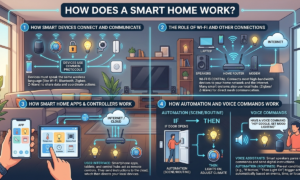
How Smart Devices Connect and Communicate
Smart devices need a communication method to exchange information or receive commands. Some devices connect directly to a home network. Others can communicate through a hub, controller, bridge, or another compatible device. The exact arrangement depends on the product and smart-home platform.
Different technologies can be used for these connections. Matter, for example, is a smart-home connectivity standard that can use Wi-Fi, Thread, and Ethernet for device communication, while Bluetooth Low Energy can be used during device setup.
The Role of Wi-Fi and Other Connections
Wi-Fi is widely used in smart homes, but it is not the only technology available. Wi-Fi can connect compatible devices to a home network and, where supported, provide access to internet-based services. Ethernet can provide a wired network connection, while Thread is designed for low-power mesh networking. Bluetooth Low Energy can also be used for device setup and communication in supported products.
How Smart Home Apps and Controllers Work
A smart-home app provides a way for users to interact with compatible devices. Through an app, a homeowner may be able to view device information, change settings, control equipment, create schedules, or manage supported automations. Some smart-home systems also use controllers or hubs to coordinate devices. The controller may help manage communication and automation between compatible products.
However, not every smart-home setup requires a separate physical hub. Some devices can connect directly through a home network, while others may require or benefit from a controller.
How Automation and Voice Commands Work
Automation allows a compatible device to perform an action based on a predefined condition, schedule, sensor event, or rule. For example, a smart thermostat may follow a temperature schedule. A lighting system may turn compatible lights on or off according to a programmed routine.
Voice control provides another way to interact with supported devices. A compatible voice assistant can receive a spoken request and pass the command to the appropriate smart-home system.
What Devices Are Used in a Smart Home?
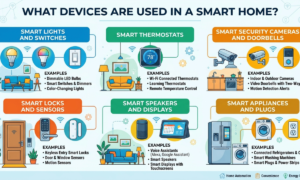
Smart Lights and Switches
Smart lights and switches are among the easiest ways to introduce connected technology into a home. Depending on the product, users may control lighting through an app, voice command, schedule, or automation. Some systems can also combine lighting with sensors or other compatible devices.
Smart Thermostats
Smart thermostats connect temperature control with digital features. Depending on the model, they can provide remote control, scheduling, learning features, sensors, energy information, or other functions. ENERGY STAR evaluates certified smart thermostats using real-world data and recognizes models that meet its requirements for energy-saving performance.
A smart thermostat does not automatically guarantee lower energy use. Actual results depend on the thermostat, heating and cooling system, settings, climate, home, and how the device is used.
Smart Security Cameras and Doorbells
Smart cameras and doorbells can connect to a network and provide features such as remote viewing or notifications, depending on the product. A connected doorbell may allow a homeowner to see activity at an entrance through a compatible app. A security camera may provide access to live or recorded video when the relevant features are available.
Smart Locks and Sensors
Smart locks can provide electronic ways to manage access to a door. Depending on the product, they may support features such as app-based control, codes, or integration with other compatible smart-home systems.
Sensors can detect conditions such as motion, temperature, contact, or other supported events. Sensors are especially useful for automation because information from one device can provide a condition for another device or routine.
Smart Speakers and Displays
Smart speakers and displays can provide convenient interfaces for controlling compatible smart-home devices. A smart speaker may support voice commands, while a smart display can provide visual controls or information in addition to voice interaction. The exact capabilities depend on the platform, device, and services connected to what is a smart home.
Smart Appliances and Plugs
Smart plugs can add connected control to compatible electrical equipment. Smart appliances can include connected features directly in products such as refrigerators, washing machines, dryers, ovens, or other household equipment. Some smart-home energy-management systems can coordinate devices such as thermostats, lighting, appliances, plug-load controls, and electric-vehicle chargers.
What Can You Do With a Smart Home?
Control Devices Remotely
Remote control is one of the basic features associated with connected-home devices. For example, a compatible smart thermostat can allow a homeowner to change temperature settings through a smartphone. Other devices may offer similar app-based controls.
Remote access can be convenient when someone wants to check or change a compatible device without being physically next to what is a smart home. The feature usually depends on the device, app, network, and service supporting the connection.
Automate Everyday Tasks
Automation can reduce the number of manual actions required for certain routines. A compatible system can use schedules, sensors, occupancy information, or predefined conditions to control devices.
For example, a thermostat can follow a programmed schedule, while compatible lights can be included in an automated routine. Automation is not unlimited. what is a smart home depends on what the individual devices and smart-home platform support.
Create Personalized Routines
Smart-home routines allow users to combine supported actions into a predefined setup. For example, a household might create an evening routine that changes selected lights and adjusts a compatible thermostat. The purpose is not necessarily to automate everything. A useful smart-home routine should solve a specific problem or make a repeated task easier.
Monitor and Manage Your Home
Smart devices can provide information as well as control. A thermostat can provide information about temperature and, depending on the model, energy-related data. A camera can provide video information. A sensor can report a detected condition.
This monitoring capability can be useful, but what is a smart home also means homeowners should understand what information their devices collect and how that information is handled.
What Are the Benefits of a Smart Home?
Convenience and Comfort
Convenience is one of the clearest reasons people use smart-home technology. A compatible device may be controlled through an app, voice command, schedule, or automation instead of requiring manual operation every time. For example, changing a thermostat setting from a phone or creating a lighting routine can make certain everyday tasks easier.
Energy Efficiency
Smart-home technology can support energy management, particularly when devices are designed and configured to reduce unnecessary energy use. Smart thermostats can use schedules and, depending on the model, features such as occupancy information or learning functions to manage heating and cooling. ENERGY STAR also recognizes smart-home energy-management systems that can schedule or automatically control compatible devices.
Improved Home Security
Connected cameras, doorbells, locks, and sensors can provide additional ways to monitor and manage parts of a home. For example, a compatible camera may provide remote viewing, while a connected doorbell can provide information about activity at an entrance.
Accessibility and Easy Control
Smart-home technology can provide different ways to interact with household devices. Depending on the system, users can control compatible devices through physical controls, smartphone apps, voice commands, schedules, or automation. Having multiple control methods can be useful for people who find certain traditional controls inconvenient or difficult to operate.
What Are the Potential Drawbacks of a Smart Home?
Cost of Smart Devices
Building a smart home can cost more than simply using traditional devices. The total cost depends on the number and type of products, whether additional controllers or hubs are needed, installation requirements, and the chosen ecosystem. The good news is that a smart home does not have to be built all at once. Starting with one or two useful devices can be a practical approach.
Internet and Connectivity Dependence
Connectivity is important to many smart-home systems, but exactly how much a device depends on the internet varies. Some devices can perform certain functions locally, while others rely more heavily on internet services or cloud-based features.
This is why it is useful to check what happens when the internet connection is unavailable. A device may continue performing some basic functions while losing remote or cloud-dependent features.
Privacy and Security Concerns
Privacy and security are important considerations because connected devices may collect, process, store, or transmit information. NIST research has identified concerns involving smart-home privacy, network security, data collection, and physical safety.
Devices with cameras, microphones, location-related functions, or other sensors can require particular attention because of the type of information they may handle.
Device Compatibility Issues
Not every smart-home device works with every platform. Different products may use different ecosystems, communication technologies, or standards. This can make compatibility an important consideration before purchasing new equipment.
Matter was developed to improve interoperability among compatible smart-home devices. However, consumers should still check the exact products and features they plan to use because support can vary. A device being labeled as compatible with one platform does not necessarily mean every feature will work identically across all platforms.
What Is Smart Home Automation?
How Smart Home Automation Works
Smart-home automation uses rules, schedules, sensors, or other conditions to make compatible devices perform actions automatically. For example, a smart thermostat can change its settings according to a schedule. A compatible lighting system can respond to a programmed routine.
Examples of Everyday Automation
Everyday automation can be relatively simple. A thermostat can follow a daily schedule. Lights can be included in a routine. A sensor can provide information that triggers a compatible action. Energy-management systems can also use scheduling or occupancy information to manage supported devices.
Smart Home Routines and Schedules
Schedules are one of the simplest forms of smart-home automation. A schedule tells a compatible device when to perform a particular action. A routine can combine several actions into one predefined sequence.
How to Start Building a Smart Home
Decide What You Want to Automate
Before buying devices, decide what you actually want to improve. You might want easier lighting control, remote thermostat access, connected security equipment, energy management, or simple automation. Starting with a clear goal can help prevent unnecessary purchases.
Choose Compatible Smart Devices
Compatibility should be checked before purchasing. Look at which platforms the device supports, which connection technologies it uses, whether a hub or controller is required, and which features are available. If you plan to expand your smart home later, choosing products that fit into the same ecosystem can make future setup easier.
Matter-compatible products can provide another option for supported smart-home devices, but you should still verify the exact compatibility and features of each product.
Set Up Your Smart Home Network
Your home network is an important part of a connected-home system. The FTC recommends changing default router credentials, using appropriate wireless encryption, keeping router software updated, and protecting connected devices with unique passwords. A secure router helps provide a stronger foundation for the devices connected to the network.
Connect and Configure Your Devices
After choosing compatible products, follow the manufacturer’s setup instructions. Depending on the device, setup may involve installing an app, connecting to a network, pairing with a controller, creating an account, updating software, and configuring settings.
Read more : Is Quikconsole com Worth Using? Honest Review
How to Keep Your Smart Home Secure
Use Strong Passwords
Use strong and unique passwords for smart-home accounts and connected devices. Avoid using the same password across multiple accounts. If a device or service supports two-factor authentication, enabling it can add another layer of account protection. The FTC specifically recommends changing default usernames and passwords and avoiding password reuse for connected devices.
Keep Devices Updated
Keep the software and firmware for your router and smart-home devices updated when updates are available. Manufacturers may release updates that address security problems, bugs, or other issues. If a device no longer receives important security updates, it may be worth reconsidering whether it should remain connected to your network.
Secure Your Wi-Fi Network
Your router deserves particular attention because connected devices commonly use it to communicate with the internet. Change default administrative credentials, use appropriate wireless security, and install available router updates.
It is also a good idea to review the devices connected to your network periodically. A secure network cannot eliminate every smart-home risk, but it is an important part of basic connected-device security.
Review Privacy Settings
Take time to understand the privacy settings available for each device. Check what information the device collects, which permissions the app requests, whether recordings or other data are stored, and what options are available for controlling those features.
This is especially important for devices involving cameras, microphones, location information, or other personal data. A smart home should be convenient, but convenience should not come at the cost of ignoring privacy.
Final Thoughts
So, what is a smart home? At its simplest, it is a home that uses connected devices to provide additional ways to control, monitor, and automate household functions. The technology can range from a single smart light or thermostat to a larger system containing lighting, security devices, sensors, appliances, and energy-management equipment.
How a smart home works depends on the devices and technologies involved. Wi-Fi, Ethernet, Thread, Bluetooth, controllers, apps, sensors, and smart-home standards can all play different roles. The biggest advantage is flexibility. You do not have to automate everything. You can choose the devices that solve genuine problems in your home and build your system gradually.
FAQs About Smart Homes
What is a smart home in simple terms?
A smart home uses connected devices to provide digital control, monitoring, or automation of household functions. Examples include smart lights, thermostats, cameras, locks, sensors, plugs, appliances, speakers, and displays.
Do smart homes need Wi-Fi?
Not always. Wi-Fi is common, but smart-home devices can also use technologies such as Ethernet, Thread, and Bluetooth Low Energy. Whether Wi-Fi or an internet connection is required depends on the device and its features.
Are smart homes expensive?
There is no fixed cost. A simple smart home can start with one or two basic devices, while a larger system may require more devices, controllers, and installation. Starting small can help you expand gradually.
Can I turn my existing home into a smart home?
Yes. Many smart-home devices are designed for existing homes. You can start with a smart light, plug, thermostat, sensor, or security device and gradually add more compatible products.
Are smart home devices safe to use?
Smart-home devices can be useful, but they can also involve privacy and security risks. Strong passwords, two-factor authentication when available, secure Wi-Fi, software updates, and careful privacy settings can help reduce these risks.